
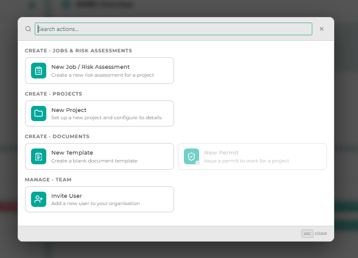
The Create button in the top bar, at the top right of every page, is the starting point for almost everything you set up in Intuety. Select it to open the menu, then pick an option or type in Search actions... to find one.
What can I create?
- New Job / Risk Assessment: set up a job and upload or create RAMS, if you are an Author. Project Admins can also start a job and assign it, but only Authors can upload or create the RAMS. See How to create a job and upload RAMS.
- New Guided RAMS: build a risk assessment step by step, if your organisation has Guided RAMS and you are an Author, Approver or Project Admin.
- New Project: if you are a Project Admin or Client Admin. See How to set up projects.
- New Template: a blank document template for the document creation module, if you are a Project Admin or Client Admin. See Creating and managing RAMS templates.
- If your organisation is a sponsored (non-paying) supplier, New Project and New Template are greyed out. They are only available to paying customers.
- New Permit: requires the permit module add-on. Without it, the option is greyed out with a message that permits are not included in your current package.
- Invite User and Import users from CSV: if you are a Client Admin. See Adding, editing and managing users.
Why can I not see some options?
Options only appear if you have the right role or your organisation has the relevant module. Options that are not in your organisation's package are greyed out; select one to see why. Check your roles.
Still need help?
Ask our live chat, email support@intuety.io or call 02922 710 527. Include the Job ID (shown in Job Quick View) if your question is about a specific job.