
The menu on the left hand side in the platform contains plenty of navigational elements. You may want to open this menu or even close it. To do this click the icon that is the most top left within the platform, it looks almost like a square with an off centre line going vertically through it.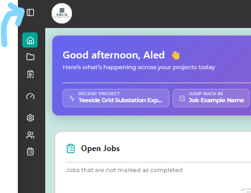
When the menu is collapsed or closed - It shows relevant icons for what you are looking for, these are:
- House icon - Takes you to the dashboard
- Folder icon - Takes you to projects/sites
- Speed Dial - Takes you to the analytics page
- Gear or Cog icon - Takes you to the settings page
- Person icon - Shows users
- Clipboard icon - Shows the form builder.
- Shield with a tick icon - Shows the 'My Admins' section.