
If you would prefer to watch a video for this guide, click here.
Log into the platform, locate the project you're working on and upload your RAMS documents. If you are unfamiliar with this process, click here.
This is the new screen that you see when opening up a set of RAMS:
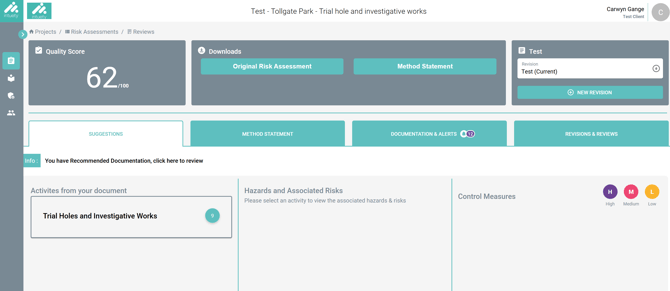
You will notice that you now work horizontally as opposed to the vertical setup that we had previously. This is closer to the traditional way of working through a risk assessment.
Pay attention to the 'High', 'Medium' and 'Low' key on the right hand side. This indicates the priority of the suggestion. For example, if something has been suggested from your SOPs/standards, it will be marked as High priority. If something is relevant to your sector, but not necessarily linked directly with the activity and risk, it may be marked as Low priority.
Click on the activity to see the associated risks:
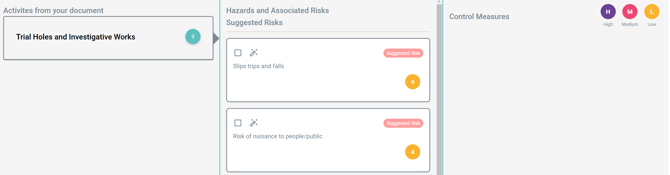
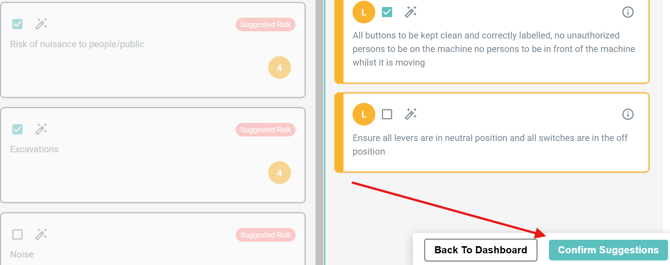
Then, click on a risk to see the suggested control measures. Simply tick the square box if you want to take an element forward to your amended risk assessment. You can also click on the pencil icon to edit the wording of any risk or control, just like you could before the update:
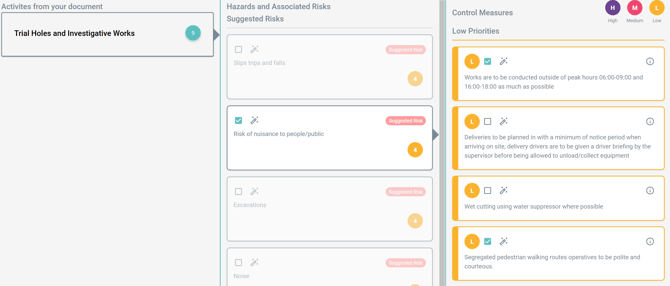
Note, risks are split as follows:
Suggested Risks - these are risks that were not included in the original risk assessment, however, they may apply to the activity that you're carrying out.
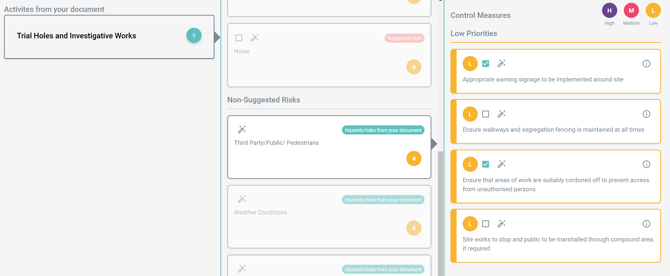
Non-Suggested Risks - these are risks that were included in the original risk assessment where Intuety has been able to add to the associated control measures.
Suggested Risks sit at the top, then if you scroll down, you will see the Non-Suggested Risks:
Once you're happy that you have selected all appropriate risks and control measures, you can lock these in by clicking 'Confirm Suggestions'.
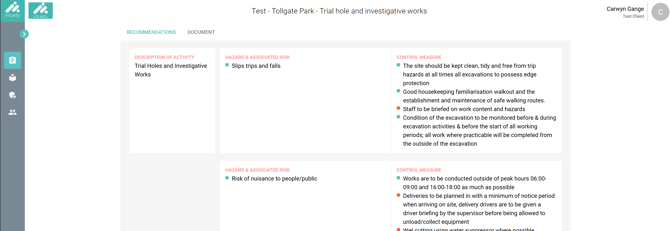
This will then take you to the Recommendations Review screen like it did before this update:
Need more help or resources? Visit:
https://linktr.ee/intuety